Automatic Cash Rule Application
Last updated: June 26, 2026
Numeric can automatically apply your cash matching rules to new transactions on a daily basis. This removes the need to manually run rules each day and helps keep your cash accounts up to date with minimal effort.
Enabling Automatic Matching
Automatic rule application is configured at the individual account level. To turn it on:
Navigate to the Cash module.
Click into the account you want to configure.
Click the Settings tab (next to Transactions).
Under the Matching section, check the box labeled "Automatically match transactions."
Repeat this for each account where you want rules to run automatically.
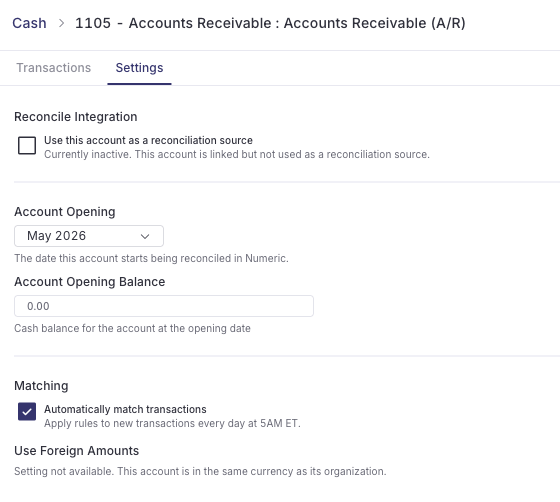
When Do Rules Run?
Once enabled, rules run automatically every day at 5:00 AM ET. The run applies your existing matching rules to any new, unmatched transactions that have been synced to the account since the last run.
Transaction Data Timing
Because the auto-run executes at a fixed time (5:00 AM ET), the transactions it picks up depend on when your bank data is available in Numeric. Most bank data flows into Numeric via SFTP, and the exact timing of when your bank delivers its files can vary.
If your bank's data file lands after the 5:00 AM ET run, those transactions won't be included until the following day's run. In practice, this means you may occasionally see a two-day lag rather than a one-day lag between when a transaction occurs and when a rule is automatically applied to it.
This is expected behavior and is driven by the timing of your bank's data delivery rather than an issue with the rules themselves. If you notice a consistent multi-day lag, reach out to the Numeric team (support@numeric.io) so we can look into the timing of your bank's data feed.