Managing User Roles & Permissions
Last updated: June 12, 2026
Managing user permissions is quick and simple from the Settings > Team page!
Adding or Editing Users
Click the ✏ pencil icon next to an existing user to update their role.
Click Invite Teammate to invite a new user and assign a role in the Settings > Team page.
Organization Permissions
In addition to user roles, you can restrict access based on NetSuite organization within the Reconciliation, Reporting, and Flux modules.
To configure organization permissions:
Navigate to Settings > Team
Update the organization permissions for each individual user
Important considerations:
New users default to having no organization access and must have permissions configured manually when added
All licensed users have access to the full platform (Reporting, Flux, Cash, Checklist). There is currently no ability to restrict individual users to specific modules.
Organization permissions are not provisioned via SCIM and must be set manually in Numeric
Warning: Modifying organization permission settings at the workspace level can wipe existing users' organization permissions. If this occurs, you'll need to manually restore access for affected users (e.g., setting 'Parent' for most users or specific entities like 'Inc.' for staff roles).
Important for SCIM Users: If your workspace has SCIM user provisioning enabled (via Okta, Google Workspace, or other identity providers), manual role changes made in Numeric will be overridden by the roles defined in your identity provider directory. For example, if you assign a user the Admin role in Numeric but they are set to Staff in your IdP, their role will revert to Staff when the SCIM sync runs. To maintain persistent role assignments with SCIM enabled, assign users to the proper roles in your identity provider directory and contact support@numeric.io to map those IdP roles to Numeric roles.
Roles & Permissions
Permission | Administrator | Manager | Staff | Viewer |
See / manage all data & features | ✅ | ✅ | ✅ | ✅ |
View and comment on data | ✅ | ✅ | ✅ | ✅ |
Add comments / links / attachments | ✅ | ✅ | ✅ | ✅ |
Submit tasks | ✅ | ✅ | ✅ | |
Create new tasks | ✅ | ✅ | ||
Assign properties to tasks | ✅ | ✅ | ||
Modify task details (others' tasks) | ✅ | ✅ | ||
Workspace Settings | ✅ | |||
Edit holidays | ✅ | |||
Create new properties | ✅ | |||
Delete tasks | ✅ |
Administrator
A fully unrestricted role that can see/manage all data & features within Numeric.
Manager
A role designed for accounting managers who help manage workflows in Numeric. This role is restricted from the following:
Inviting new users
Deleting tasks
Creating categories
Open new periods
Closing periods
Updating materiality thresholds
Managing GL Connections
Changing Workspace settings
Staff
A role designed for staff accountants that can submit tasks and add comments / links / attachments. In addition to the Manager role restrictions, this role is also restricted from the following:
Modifying task details on tasks created by other users (when not assigned to those tasks), including
Name & Description
Assignees
Due Dates
Automations
Note: Staff users can modify tasks they are assigned to, including creating subtasks for those tasks.
Viewer
This view-only role is great for inviting your auditor or other internal stakeholders to view and comment on data in Numeric. This role is restricted from performing any actions within the platform, including submitting tasks.
Deleting Tasks
To delete a task, open the task sidebar, click the 3‑dot menu in the top‑right corner, and select “Delete Task”. For recurring tasks, you’ll be prompted to delete a single instance or all future instances.
Note: Reconcile tasks (tasks tied to GL accounts) cannot be deleted. If you need to remove a reconcile task from your checklist, unassign any properties tagged to the task or change the reconciliation frequency to “never”.
Use the Filter Functionality: Access the built‑in filter options in the top‑right corner of the checklist tab to filter out reconcile tasks from your view. This approach is more convenient than modifying task properties and allows you to quickly customize which tasks appear without making permanent changes.
Temporarily hide reconcile tasks to focus on other work
Create a cleaner checklist view without permanently altering task settings
Quickly toggle between seeing all tasks and seeing only non‑reconcile tasks
Why You Might Not See the Delete Option
If you don’t see the delete option in the 3‑dot menu, this is expected behavior – the delete functionality is only visible to users with the Administrator role. Staff, Manager, and Viewer roles cannot delete tasks, which helps maintain data integrity and workflow control.
Report Access
Report Visibility
All users can view reports. However, entity-level access restrictions can be configured to control who sees financial data based on their assigned entity.
Entity-Based Permissions
Permissions can restrict visibility of financial data, such as:
Reconciliation balances
Flux balances
Transactions
Important: When entity restrictions are first enabled for a workspace, all non-administrator users (Managers, Staff, and Viewers) will lose access to reports by default until specific entities are assigned to them. Administrators can assign entity access to users in Settings > Team.
Caveat: Entity-level restrictions do not apply to checklist items, which remain visible to all users.
Access Similarity with NetSuite (NS):
Users with NS access can view all General Ledger (GL) data.
This mirrors our current setup, meaning no additional data is exposed.
NS also supports entity-based restrictions and differentiates between public and private reports.
Report Builder Access
The Report Builder is currently available to all workspaces enriched with a NetSuite general ledger integration.
Within eligible workspaces:
Administrators and Managers have full access to view, edit, and save reports.
Staff and Viewers do not have access to save or edit reports.
For more details, refer to our 📄 Report Builder Guide.
Exporting Users and Roles
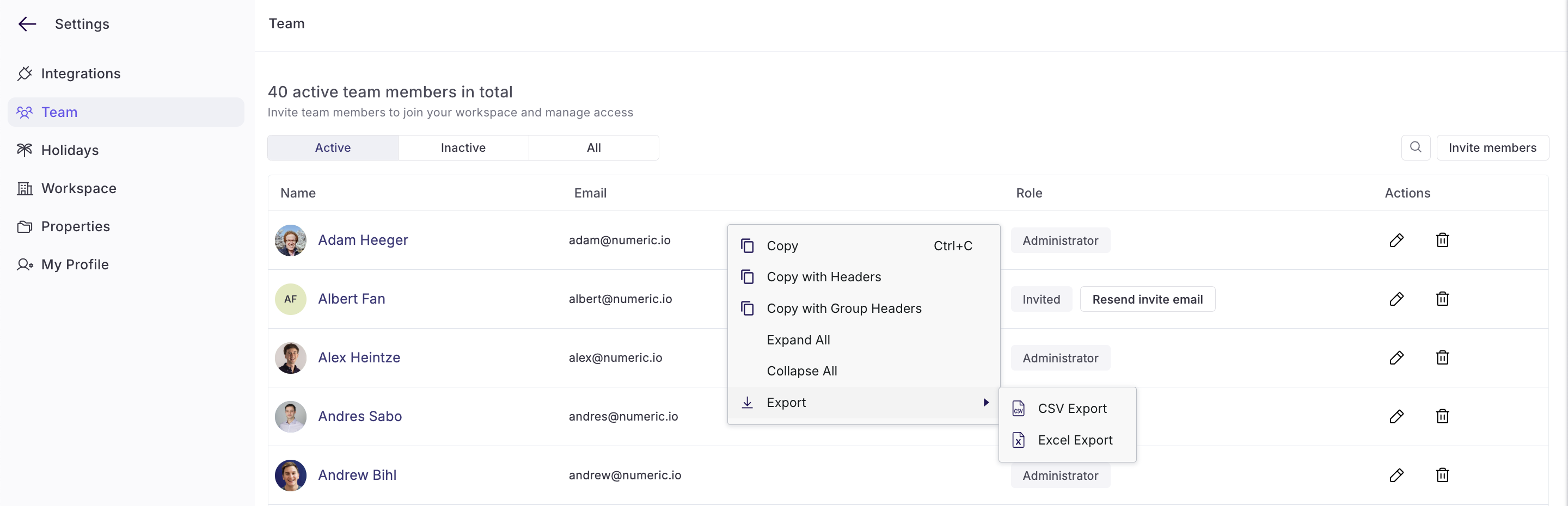
Right click the table in Settings > Team to download a list of users and roles.
Essentials Tier Restrictions
Some customers may still be on our legacy Essentials (free) tier, which includes the following limitations:
User roles cannot be modified
New team members can only be invited as Administrators
A maximum of 2 automations can be created per workspace
We are currently phasing out the Essentials tier. For continued access to full functionality and support, reach out to support@numeric.io to learn about upgrade options.